 CREparser
Lease abstracts you can check in one click.
Attach a lease and ask. Key terms, the rent schedule, critical dates and risk flags come back in the chat, each tied to the clause it came from.
Watch the videoYour first 5 documents are free, no card needed. No lease handy? Try our sample lease.
Abstract this lease.
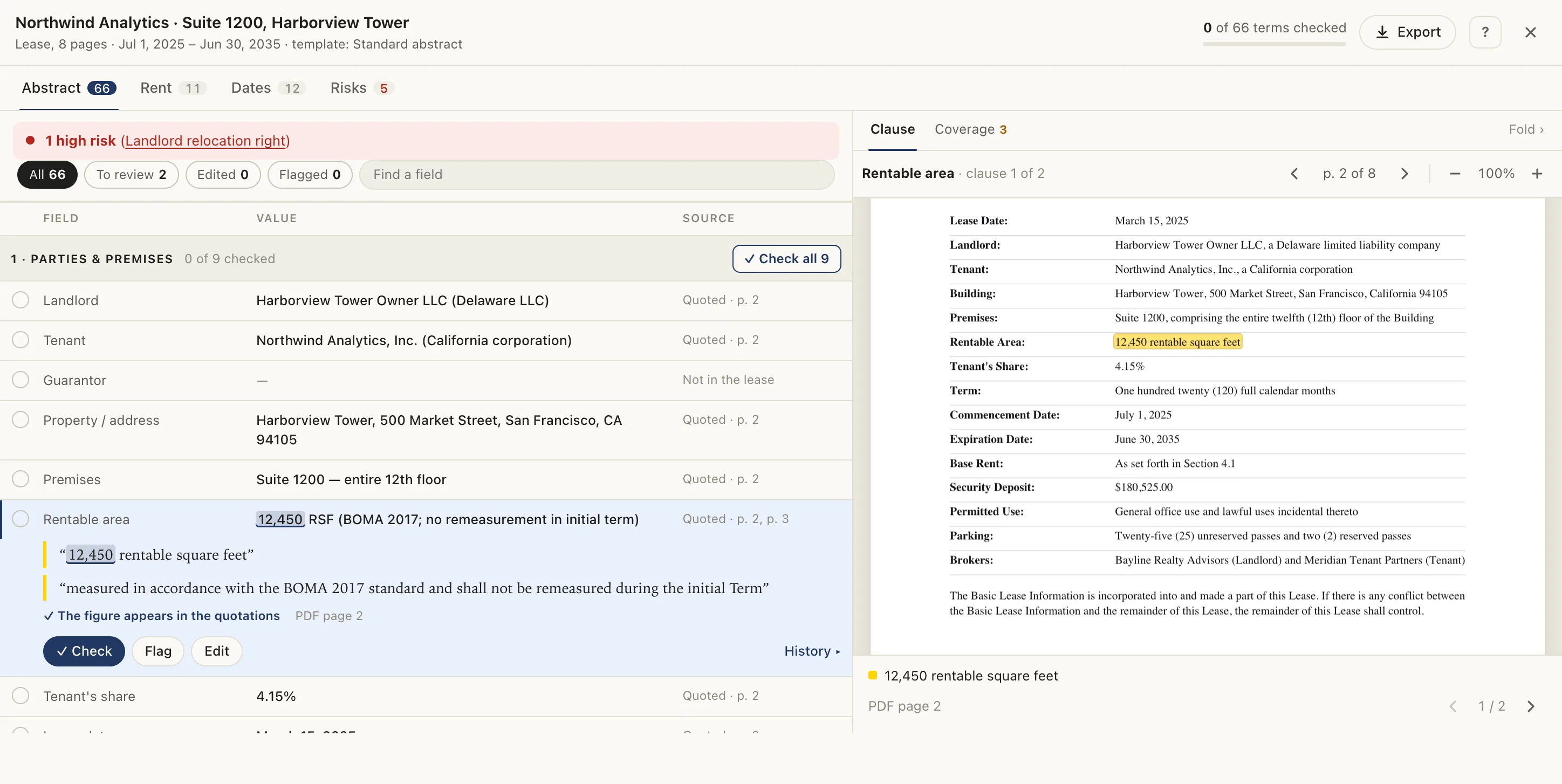
Here’s the abstract. Every term is cited to its clause, and one high-risk clause needs a look.
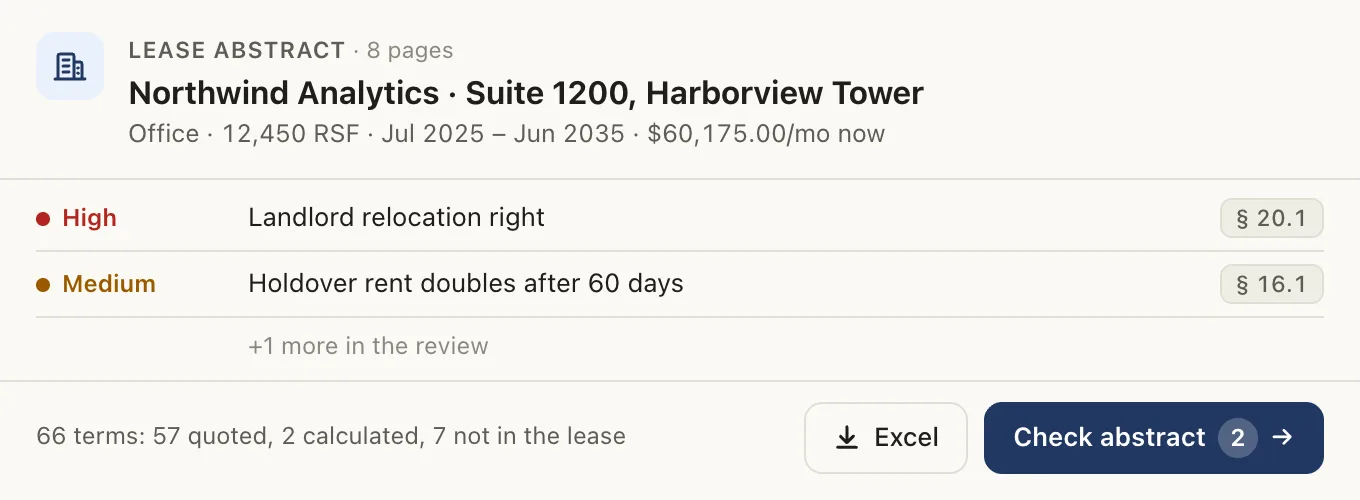
This is the review you get back.
The abstract opens right in the conversation, next to the lease. Click any term to jump to its clause, then approve it or flag it. With Deal Review, bring the rest of the deal too, from the rent roll and T12 to estoppels and CAM reconciliations.
Every term with its quote and page, highlighted in the lease.
Lease Abstraction
Deal Review adds
Checking an abstract shouldn’t mean reading the lease twice.
CREparser does the reading inside ChatGPT and Claude and shows its work. Every term carries the quote, page and clause it came from. Every calculated date shows its arithmetic. Anything the lease doesn’t say is marked as not in the lease, never guessed.
Your review becomes one click per item: open the source, approve it or flag it, and move on. When you’re done, export the abstract for the file.
Ask what you’d ask a colleague.
Abstract the lease, then ask about it in plain words: deadlines, rights, who pays for what. Ask across a portfolio of leases or, with Deal Review, check the offering memo against the T12 and rent roll.
- Abstract a lease
Abstract this lease, and also capture parking, signage rights and the generator clause.
- Ask about the lease
What’s the last day we can give notice to renew, and how is the renewal rent set?
- Ask about the lease
Can the landlord relocate us? On how much notice, and who pays for the move?
- Ask about the lease
Does a change of control count as an assignment? Quote the clause.
- Work across leases
Which of these leases have a notice deadline in the next 12 months?
- Review a deal
Check this OM against the T12 and rent roll.
Add it to Claude or ChatGPT in about a minute.
Sign in with Google the first time and a free account is created, with 5 documents to try. No card needed. One account works in both.
- 1
Open it in Claude
CREparser Lease Abstraction is in Claude’s directory.
Open in Claude - 2
Add and connect
Choose Add to Claude. When Claude asks, connect and sign in to your CREparser account.
- 3
Attach and ask
“Abstract this lease.” “When is the renewal notice due?” “Tie this rent roll out against the leases.” More to ask
CREparser Deal Review is coming soon to Claude’s directory. Email us for early access.
Tip: so Claude can send your attachment straight to CREparser, add mcp.creparser.com under Settings → Capabilities → Code execution and file creation → Network access. Otherwise Claude asks you to pick the file. Using Claude Code? See Support.
- 1
Open it in ChatGPT
CREparser Deal Review is in ChatGPT’s app directory.
Open in ChatGPT - 2
Connect
Choose Connect, and sign in to your CREparser account.
- 3
Attach and ask
“Abstract this lease.” “When is the renewal notice due?” “Tie this rent roll out against the leases.” More to ask
CREparser Lease Abstraction on its own is coming soon to ChatGPT. Until then, Deal Review includes it.
No lease handy? Try the sample office lease, or for Deal Review its building’s rent roll. Setting it up for a team? Email creparser@superdocs.io.
Two plugins. Install the one you need.
Lease AbstractionLease administrators, tenant reps, brokers and attorneys | Deal ReviewAcquisitions, asset management and lending teams | |
|---|---|---|
| Key terms, each linked to its highlighted clause | ||
| Rent schedule, critical dates with notice deadlines, risk flags | ||
| Amendments applied, with replaced terms kept | ||
| Portfolio view across up to 10 leases | ||
| Rent rolls tied out against each lease | – | |
| T12 totals and NOI checked month by month | – | |
| Offering memorandum claims tested against the documents | – | |
| Loan terms, reserves, covenants and deadlines | – | |
| Appraisals, estoppels and CAM reconciliations checked against the documents | – | |
| Files | PDF, Excel, CSV |
One account works with both, and Deal Review Pro includes everything in Lease Abstraction. Export the abstract as a PDF report, Excel or CSV, a calendar of critical dates, lease accounting inputs for ASC 842 and IFRS 16, or the document with its cited clauses highlighted.
Start free. Pay when you’re abstracting every week.
Lease Abstraction Pro
$99 a month
10 leases a month, amendments included
- The count starts again each month on the day you subscribed
- Cancel anytime; Pro lasts to the end of the paid month
- Subscribe here, or from the chat: ask “What’s my CREparser plan?”
Deal Review Pro
$199 a month
30 documents a month, leases included
- Everything in Lease Abstraction Pro
- All seven deal reviews, from the OM to CAM reconciliations
- The better deal from about 17 leases a month
Need more in a month? Extra documents are $15 each, used after your plan’s documents and valid for 12 months. A document is one file you import, such as a rent roll, an offering memorandum or an estoppel certificate. A lease counts as one document together with its amendments. Sales tax or VAT is added at checkout where it applies, and payment happens on a secure checkout page, never in the chat. Already subscribed? Manage your subscription.
Need CREparser on your own infrastructure? Lease Abstraction and Deal Review are also available on a dedicated server or in your private cloud. Email creparser@superdocs.io.
Your documents stay yours.
Deleted after 24 hours
Documents and abstracts are deleted 24 hours after you last use them. Ask the assistant to delete one sooner at any time.
Not used for training
Your documents are never used to train AI models.
You make the call
Every quote, cell and calculation is checked against the source so you can verify fast.
Questions
Do I need both plugins?
No. Deal Review includes everything in Lease Abstraction, so install one. Choose Lease Abstraction if you only work with leases.
Which files can I use?
Leases, amendments, offering memoranda, loan agreements, appraisals, estoppel certificates and CAM reconciliations as PDFs; rent rolls and T12s as PDF, Excel or CSV. Scanned PDFs need text recognition (OCR) first.
Which assistants does it work with?
Claude and ChatGPT, and the review opens right in the conversation. Lease Abstraction is in Claude’s directory, on the web, desktop and mobile apps, in Cowork and in Claude Code; Deal Review is coming soon there. Deal Review is in ChatGPT’s app directory, and it includes Lease Abstraction. One CREparser account and one document allowance work in both.
What happens to my documents?
Documents are deleted 24 hours after you last use them, and only your account can open them. Ask the assistant to delete one sooner at any time. They are never used to train AI models.
How do I upgrade or cancel?
Open Account at the bottom of this page and sign in to subscribe, buy extra documents or manage billing. Or ask the assistant “What’s my CREparser plan?”: it shows what’s left of your 5 free documents or your plan, with a link to do the same.
Is this legal or investment advice?
No. It’s a reading of your documents with every quote, cell and calculation checked against the source, so you can verify it quickly. Your own review still decides.
Abstract your next lease in Claude or ChatGPT.
5 documents free. Every term one click from its clause.